



Your next visitor may be someone comparing providers. It may also be software that person has asked to carry out research: find a consultancy, check an offer or prepare an enquiry. In both cases, your website needs to explain clearly what you do and how to take the next step.
I chose to start with my own website. Kanexio already had service pages, content readable without JavaScript and public contact details. Yet the initial diagnostic still identified several dead ends for agents. Here is what we fixed, together with the evidence you can check.1
From 75 to 100/100: what the evidence shows
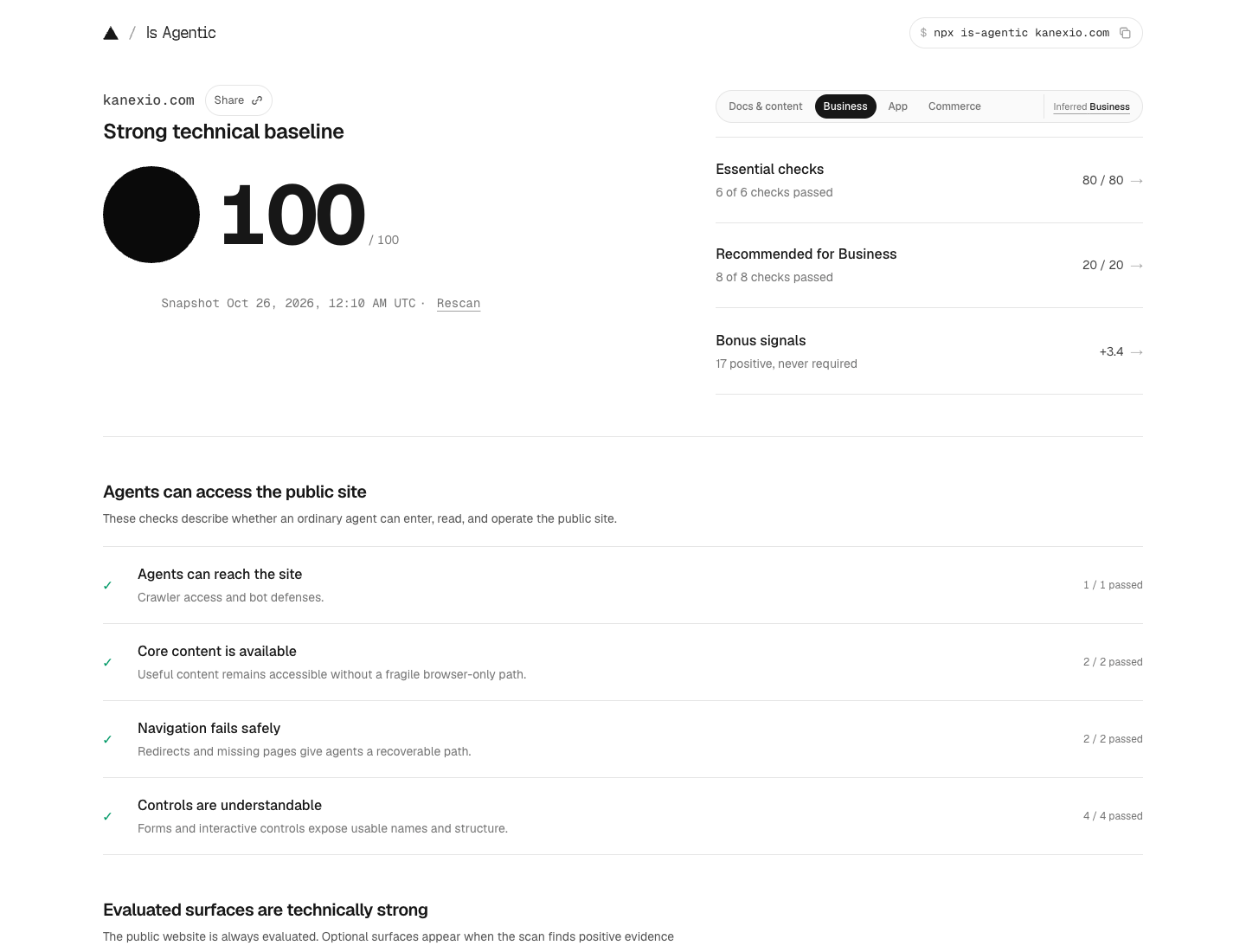
The initial diagnostic supplied for this project reported 75/100. After the fixes, the public Is Agentic report shows 100/100 for Kanexio. The snapshot is dated 26 October 2026 at 00:10 UTC, or 01:10 in Brussels. The two values represent a difference of 25 points on this tool’s scale.12
These records have different origins. The 75/100 comes from the initial diagnostic supplied at the start of the project; I do not have a historical screenshot of that screen. The 100/100 is visible in the public report and the original screenshot shown here. The before and after HTTP observations are also available.12
A technical score that needs context
Is Agentic presents the checks run by Ora, grouping them by maturity and applicability to the website. The methodology gives fundamentals a central role and excludes criteria that do not apply. To understand a result, I therefore recommend opening the evidence behind each check.3
The 100/100 is a dated finding about the surfaces assessed. It does not measure sales, the quality of advice or how often an AI response cites the website. The tool’s methodology also explains that this is not a security, accessibility or compliance certification.3
One business, several ways to discover it
A person reads headings, looks at images and chooses a path. An assistant may start with an HTTP request, a page excerpt or a document index. Its need remains practical: find usable information and trace it back to its source.
On Kanexio, HTML remains the format for ordinary browsing. The homepage also offers a Markdown representation when the client requests it. Both present the same public information; the latter avoids bringing navigation, styles and scripts into the reading of the main content.1
Reading in the browser
Accept: text/html

HTTP 200
Content-Type: text/html; charset=utf-8
Vary: Accept
Reading requested by the agent
Accept: text/markdown

HTTP 200
Content-Type: text/markdown; charset=utf-8
Vary: Accept
The Markdown negotiation shown here applies to the homepage. Linked service pages remain available in HTML. Every endpoint you advertise needs checking, including its content type and actual response body.
The five fixes made to Kanexio
The work addressed the issues raised by the diagnostic. I present them as experience from this website: a useful starting point for checks, to adapt to your hosting and user journeys.
Actually serve the requested format
Before the fix, a homepage request with Accept: text/markdown received HTML. The 200 status only showed that the request had succeeded. We added a real Markdown response with Content-Type: text/markdown and Vary: Accept, while keeping the HTML representation for browsers.145
The Markdown version is generated from the main content of the final HTML. This reduces the risk of maintaining two different messages. Verification compares the status, headers and received text. It also alternates HTML and Markdown requests to detect cache mix-ups.1
View the technical checks
curl -sS -L -i -H 'Accept: text/markdown' https://kanexio.com/
curl -sS -L -i -H 'Accept: text/html' https://kanexio.com/
curl -sS -L -i -H 'Accept: text/markdown' https://kanexio.com/__kanexio-agent-article-404-20261026Explain when to approach the consultancy
The llms.txt file already existed. It listed content, but the diagnostic found no sufficiently clear guidance on suitable uses. We specified the needs Kanexio addresses: digital priorities, website creation, visibility, automation, identity and training.1
The guide also explains how to read sources and prepare an enquiry. It describes a human contact process: gather useful information, check the published terms and suggest the right channel to the user. llms.txt remains a documentation proposal; its presence does not prove that an assistant will read it or cite the website.6
Read the published agent instructionsGive missing pages a useful way forward
The previous response already returned the correct 404 status. The missing piece was its body: an agent requesting Markdown still received an HTML page. The new response keeps 404 and explains in Markdown that the content cannot be found, with links to the homepage, llms.txt and the sitemap.1
This detail matters during research. An incorrect address should make the document’s absence clear and provide a way back to a valid entry point. We checked simple paths, nested paths and paths ending in an extension, inspecting the response body each time.1
Restore the heading order in HTML
The homepage already contained its H1 and enough text. However, an H2 in the search dialog appeared before it in the raw document. The dialog label became a paragraph, retaining its accessible name and typography. The main H1 is now the document’s first heading.1
H2Search dialog label
H1Main homepage heading
PSearch dialog label
H1Main homepage heading
We also moved the Trust chapter heading to H2. This is a structural correction. The message, search controls and presentation remain consistent for people using the website.1
Make trust pages easy to find
The privacy policy was already published at /confidentialite/. We connected the /privacy and /about entry points to the existing canonical pages with permanent redirects, and checked the Contact page. The actual content and final destination were verified.1
For your business, these pages should let visitors check who publishes the website, how to contact the company and what it says about the data it processes. Their information needs to stay aligned with the forms and providers actually used.
View the privacy pageYour starting checklist
Tick the points you have actually checked. These boxes support your reading of this page: they do not run an audit, transmit data or calculate an Is Agentic score.

How to repeat the checks on your website
Start by retaining an initial record: date, URL, website type, report and observed responses. Then fix the points that actually fail. Once the changes are published, check the public domain and relevant endpoints, then request a new audit. The comparison is more useful when the scope and method remain documented.
The public report may be a cached snapshot. Its date therefore matters. To follow a project, keep screenshots and observations for each stage, clearly explaining what they establish. A correct technical response and an observed user journey provide complementary evidence.3
Questions before getting started
What exactly does 100/100 measure?
It summarises the technical checks applicable to the website in that Is Agentic snapshot. Understanding its scope requires reading the criteria, evidence and date. The score does not quantify the business impact of these fixes.
Does an SME need an API or an MCP server?
That depends on the service you want to provide. The Is Agentic methodology activates checks for API or MCP surfaces when they are identified. In this case, the work focused on reading the public website and directing users towards human contact.
Do you need to rebuild the entire website first?
An assessment should come before that decision. Some fixes concern hosting, others HTML structure, content or links. The Kanexio case shows a targeted project; it cannot establish the work needed on another website without examining it.
Does your website help people move from reading to the right next step?
I help you examine your digital presence, prioritise fixes and define how to implement them. We start with your business, your user journeys and what can be verified.
Sources, evidence and method
Sources accessed and evidence archived on 26 October 2026. Links to tools or organisations do not imply a partnership with or commercial endorsement of Kanexio.
- [1]Kanexio · project observations
Initial diagnostic supplied by the owner, archived before and after HTTP observations, evidence provenance and timestamps.
Verified on 26 October 2026 - [2]Is Agentic · kanexio.com report
Public score of 100/100 and snapshot dated 26 October 2026 at 00:10 UTC, captured and accessed the same day.
Verified on 26 October 2026 - [3]Is Agentic · methodology
Score scope, applicability of checks, report caching and limits on interpretation.
Verified on 26 October 2026 - [4]IETF · RFC 9110
HTTP semantics, content negotiation, response statuses and the Vary field.
Verified on 26 October 2026 - [5]
- [6]llmstxt.org · llms.txt proposal
File structure and links to reference content useful to agents.
Verified on 26 October 2026 - [7]Accept Markdown · negotiation convention
Practical checks of the format, headers and Accept preferences.
Verified on 26 October 2026